> ## Documentation Index
> Fetch the complete documentation index at: https://instro.nominal.io/llms.txt
> Use this file to discover all available pages before exploring further.
# Electronic Load (ELoad)
> Using InstroELoad for SCPI-based programmable electronic loads
`InstroELoad` provides a unified interface for programmable electronic loads. This class is initialized with a vendor-specific driver (`BK85XXB`, …), and provides the vendor-agnostic API (`set_mode`, `set_level`, `get_voltage`, …).
## Creating an InstroELoad
```python theme={null}
from instro.eload.drivers.bk_85xxb import BK85XXB
from instro.eload import InstroELoad
eload = InstroELoad(
name="myELoad",
driver=BK85XXB(visa_resource="USB0::0x0614::0x0960::8514B12345::INSTR"),
)
```
## Supported Vendors
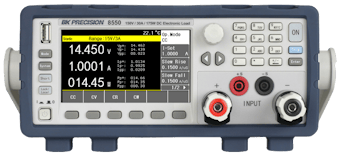 If your vendor or model is not listed, see [Custom Driver Development](/library/custom-instruments#electronic-load-eload), or open a [Driver Request](https://github.com/nominal-io/instro/issues) issue on GitHub.
## Example
More examples found in [Examples](examples/eload/index)
## Details
The following presents details about the `InstroELoad`. Specific driver details can be found on [their pages](#supported-vendors).
### Driver Composition
An `InstroELoad` is built from a concrete driver:
```
InstroELoad("name", driver=BK85XXB(visa_resource="USB0::..."))
```
* **`BK85XXB`** owns the connection setup and vendor-specific command mapping.
* **`InstroELoad`** owns the category-level workflow: measurements, commands, publishers, the background daemon.
### Lifecycle
The typical InstroELoad workflow:
1. **Construct**: instantiate the vendor driver and pass it to `InstroELoad`.
2. **`open()`**: establishes the VISA connection.
3. **Configure and measure**: set operating mode, level, range, and read measurements.
4. **`start()`**: begins a periodic background daemon. (Optional)
5. **`stop()`**: ends the background daemon (if started).
6. **`close()`**: disconnects from hardware.
### Operating Modes
Electronic loads can operate in four modes:
* **CC (Constant Current)**: the load draws a constant current regardless of voltage
* **CV (Constant Voltage)**: the load maintains a constant voltage across its terminals
* **CR (Constant Resistance)**: the load simulates a constant resistance
* **CP (Constant Power)**: the load draws constant power
**Mode Configuration Required**
The operating mode must be set using `set_mode()` before you can configure the level or range. Not all electronic loads support all four modes. Consult your instrument's manual.
`set_range()` applies to CC and CV modes only; CP and CR are auto-ranged from the level value (on the `BK85XXB` driver, calling `set_range()` in CP or CR mode raises `NotImplementedError`).
### Init from a Config File
`InstroELoad` can also be constructed directly from a JSON config file, which removes the need to write any Python setup code:
```python theme={null}
from instro.eload import InstroELoad
eload = InstroELoad(config="bench_eload.json")
```
Where `bench_eload.json` contains:
```json theme={null}
{
"version": 1,
"instrument": "InstroELoad",
"device": {
"name": "bench_eload",
"description": "Bench electronic load",
"manufacturer": "B&K Precision",
"model": "8514B"
},
"driver": {
"connection_type": "visa",
"name": "BK85XXB",
"visa": {
"visa_resource": "ASRL3::INSTR",
"serial_config": {
"baud_rate": 9600,
"data_bits": 8,
"parity": "N",
"stop_bits": 1
}
}
},
"load": {
"mode": "CC",
"level": 1.5,
"range": 5.0,
"slew_rate": {
"direction": "BOTH",
"rate": 0.5
}
},
"timing": {
"poll_interval": 1.0
},
"publishers": [
{
"type": "NominalCorePublisher",
"dataset_rid": ""
}
]
}
```
See [Config Files](/library/config-files) for the full field reference.
## Custom Driver Development
For more information on writing a custom driver, see [Custom Driver Development](/library/custom-instruments#electronic-load-eload).
If your vendor or model is not listed, see [Custom Driver Development](/library/custom-instruments#electronic-load-eload), or open a [Driver Request](https://github.com/nominal-io/instro/issues) issue on GitHub.
## Example
More examples found in [Examples](examples/eload/index)
## Details
The following presents details about the `InstroELoad`. Specific driver details can be found on [their pages](#supported-vendors).
### Driver Composition
An `InstroELoad` is built from a concrete driver:
```
InstroELoad("name", driver=BK85XXB(visa_resource="USB0::..."))
```
* **`BK85XXB`** owns the connection setup and vendor-specific command mapping.
* **`InstroELoad`** owns the category-level workflow: measurements, commands, publishers, the background daemon.
### Lifecycle
The typical InstroELoad workflow:
1. **Construct**: instantiate the vendor driver and pass it to `InstroELoad`.
2. **`open()`**: establishes the VISA connection.
3. **Configure and measure**: set operating mode, level, range, and read measurements.
4. **`start()`**: begins a periodic background daemon. (Optional)
5. **`stop()`**: ends the background daemon (if started).
6. **`close()`**: disconnects from hardware.
### Operating Modes
Electronic loads can operate in four modes:
* **CC (Constant Current)**: the load draws a constant current regardless of voltage
* **CV (Constant Voltage)**: the load maintains a constant voltage across its terminals
* **CR (Constant Resistance)**: the load simulates a constant resistance
* **CP (Constant Power)**: the load draws constant power
**Mode Configuration Required**
The operating mode must be set using `set_mode()` before you can configure the level or range. Not all electronic loads support all four modes. Consult your instrument's manual.
`set_range()` applies to CC and CV modes only; CP and CR are auto-ranged from the level value (on the `BK85XXB` driver, calling `set_range()` in CP or CR mode raises `NotImplementedError`).
### Init from a Config File
`InstroELoad` can also be constructed directly from a JSON config file, which removes the need to write any Python setup code:
```python theme={null}
from instro.eload import InstroELoad
eload = InstroELoad(config="bench_eload.json")
```
Where `bench_eload.json` contains:
```json theme={null}
{
"version": 1,
"instrument": "InstroELoad",
"device": {
"name": "bench_eload",
"description": "Bench electronic load",
"manufacturer": "B&K Precision",
"model": "8514B"
},
"driver": {
"connection_type": "visa",
"name": "BK85XXB",
"visa": {
"visa_resource": "ASRL3::INSTR",
"serial_config": {
"baud_rate": 9600,
"data_bits": 8,
"parity": "N",
"stop_bits": 1
}
}
},
"load": {
"mode": "CC",
"level": 1.5,
"range": 5.0,
"slew_rate": {
"direction": "BOTH",
"rate": 0.5
}
},
"timing": {
"poll_interval": 1.0
},
"publishers": [
{
"type": "NominalCorePublisher",
"dataset_rid": ""
}
]
}
```
See [Config Files](/library/config-files) for the full field reference.
## Custom Driver Development
For more information on writing a custom driver, see [Custom Driver Development](/library/custom-instruments#electronic-load-eload).